
Projects · 2026-09-10
Building KDE Webapp Manager: Fixing My Daily Workflow on Plasma

I spend most of my day inside the KDE Plasma desktop. Like many developers, my daily workflow relies heavily on tools that live in the browser: WhatsApp Web, Gemini, project boards, and streaming services. While running them inside standard browser tabs works, it quickly turns into tab clutter. Worse, conventional web shortcuts have always felt half-baked on Linux: generic browser icons on the taskbar, session leaks across your main profiles, and broken window grouping on Wayland.
Tired of manually hacking .desktop files and wrestling with KWin rules every time I wanted a dedicated app container, I decided to build a proper, native tool to handle it: KDE Webapp Manager.
The Annoyances I Wanted to Eliminate
When using Chromium-based browsers with the --app= flag, several issues consistently degraded the desktop experience:
- Task Manager Identity Crisis: Under Wayland, running a standalone webapp often groups the window right back with your main browser instance, displaying the default browser icon instead of the webapp’s branding.
- Shared Sessions: Launching a webapp without an isolated profile means your main browser sessions, extensions, and caches bleed into dedicated apps.
- The
$HOMEPath Bug: Manually hacking launch scripts without proper shell expansion frequently generated awkward directories (like a literal~/home/user/$HOMEfolder) inside your user directory just to isolate--user-data-dir. - Clunky Management: Creating, updating, or deleting these shortcuts via
kmenueditfelt disjointed and required manual housekeeping across multiple configuration files.
What KDE Webapp Manager Does
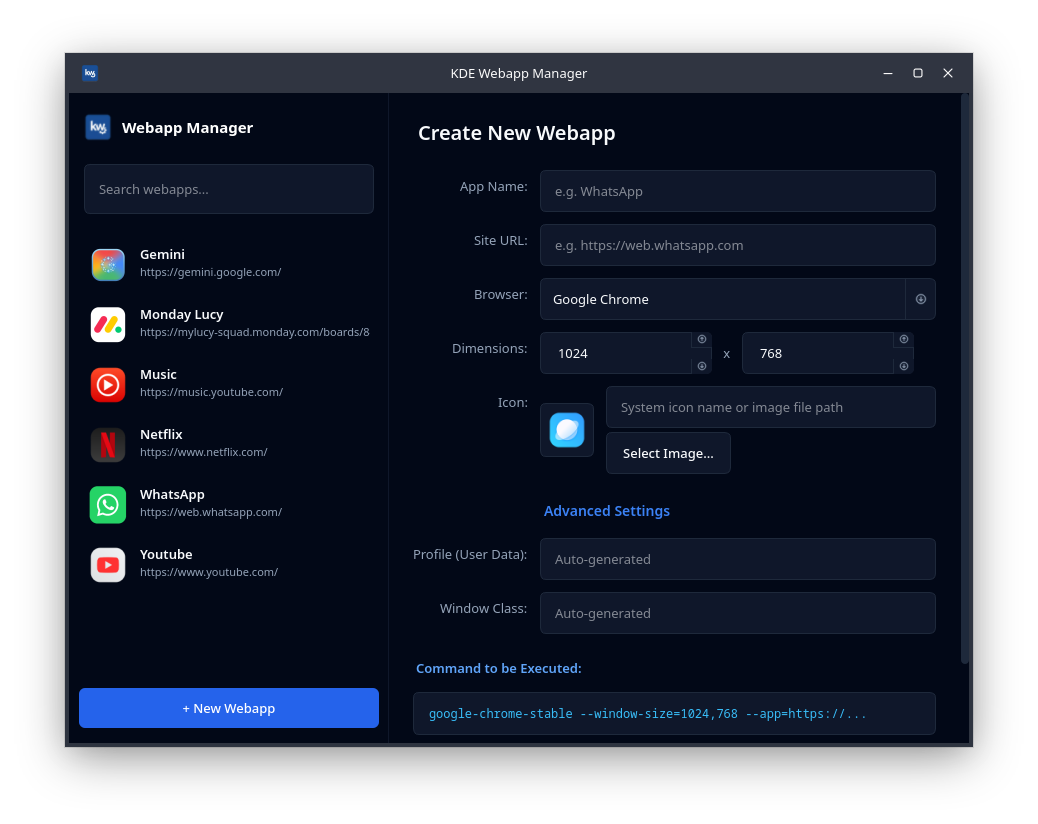
Built entirely with PyQt6, the utility blends straight into modern Plasma styling with clean spacing, proper dark theme detection, and responsive controls.
- Automated KWin Window Rules: When you save a webapp, the tool calculates the exact Wayland
App IDor X11WM_CLASSgenerated by Chromium (such aschrome-web.whatsapp.com__-Default). It writes the rule directly to~/.config/kwinrulesrcand triggers an instant DBus reload viaqdbus. Your task manager immediately recognizes the individual window, pins the correct custom icon, and groups it separately from regular browser windows. - Zero Session Bleed: Every shortcut runs with its own isolated
--user-data-dir. Your work chats and personal browsers stay entirely compartmentalized. - Legacy Scanner & Auto-Migration: It scans existing shortcuts created through manual editors, pulls them into the manager, and automatically resolves broken literal
$HOMEpath references without breaking existing sessions. - Multi-Browser Engine Support: The manager automatically detects Chromium engines across your system—including native and Flatpak builds of Google Chrome, Brave, Microsoft Edge, Vivaldi, and vanilla Chromium.
Installation & Source
The project is fully open-source under the MIT license.
- Arch Linux / AUR:
paru -S kde-webapp-manager-git
# or
yay -S kde-webapp-manager-git
- Manual Setup (Debian / Ubuntu / Fedora / Other distros):
# Ensure Python 3 and PyQt6 are installed
git clone https://github.com/satodu/kde-webapp-gen.git
cd kde-webapp-gen
./install.sh
Once installed, launch it straight from K-Menu or terminal via kde-webapp-manager.
Building this turned a tedious manual routine into a one-click flow, giving webapps the polished, standalone desktop presence they should have had all along on KDE Plasma.