
Why build itPor que construir
Most IPTV apps look like the same template: a purple gradient, tiny tiles, a remote that gets lost between a banner and a sidebar. I wanted one that felt like it had an opinion.
Panda IPTV started as a weekend itch on my own Arch box and grew into something I ship to four operating systems. The rule never changed: it is a client. It plays what you are allowed to play, and nothing else.
A maioria dos apps de IPTV parece o mesmo template: gradiente roxo, tiles minúsculos, um controle remoto que se perde entre um banner e uma sidebar. Eu queria um que tivesse opinião.
O Panda IPTV nasceu de uma coceira de fim de semana no meu Arch e virou algo que eu publico para quatro sistemas. A regra nunca mudou: é um cliente. Ele toca o que você tem direito de tocar, e nada além disso.
A player should disappear. The interface should not.O player deve sumir. A interface não.
What it doesO que faz
- 01
Live TV + EPGTV ao vivo + EPG
Slide-out channel guide, number badges and recent channels.Guia de canais deslizante, números de canal e canais recentes.
- 02
Movies & seriesFilmes e séries
Seasons, episodes and a 6-second countdown to the next one.Temporadas, episódios e contagem de 6 segundos para o próximo.
- 03
Continue watchingContinuar assistindo
Resume from the exact second, with a remaining-time badge.Retome do segundo exato, com selo de tempo restante.
- 04
Decoder switcherTroca de decoder
SW Safe, Auto-Copy or HW Direct, on the fly. Safe by default on Wayland + Nvidia.SW Safe, Auto-Copy ou HW Direct, na hora. Seguro por padrão em Wayland + Nvidia.
- 05
Smart loginLogin inteligente
Normalizes pasted URLs, remembers the session, pre-fills after logout.Normaliza URLs coladas, lembra a sessão, preenche após o logout.
- 06
EN · PT · ESPT · EN · ES
Switch language in Settings without restarting.Troque o idioma nas Configurações sem reiniciar.
ScreensTelas
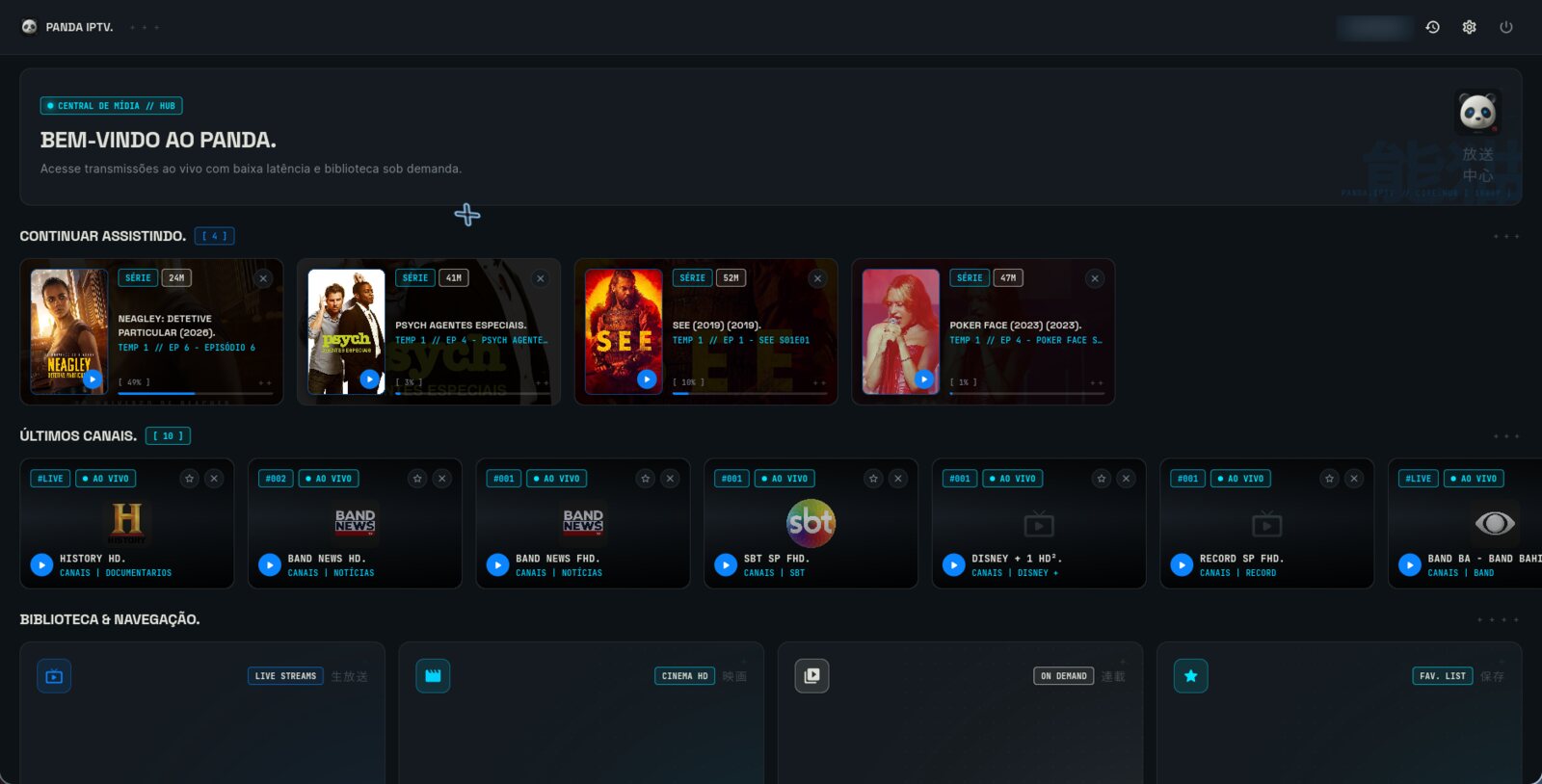
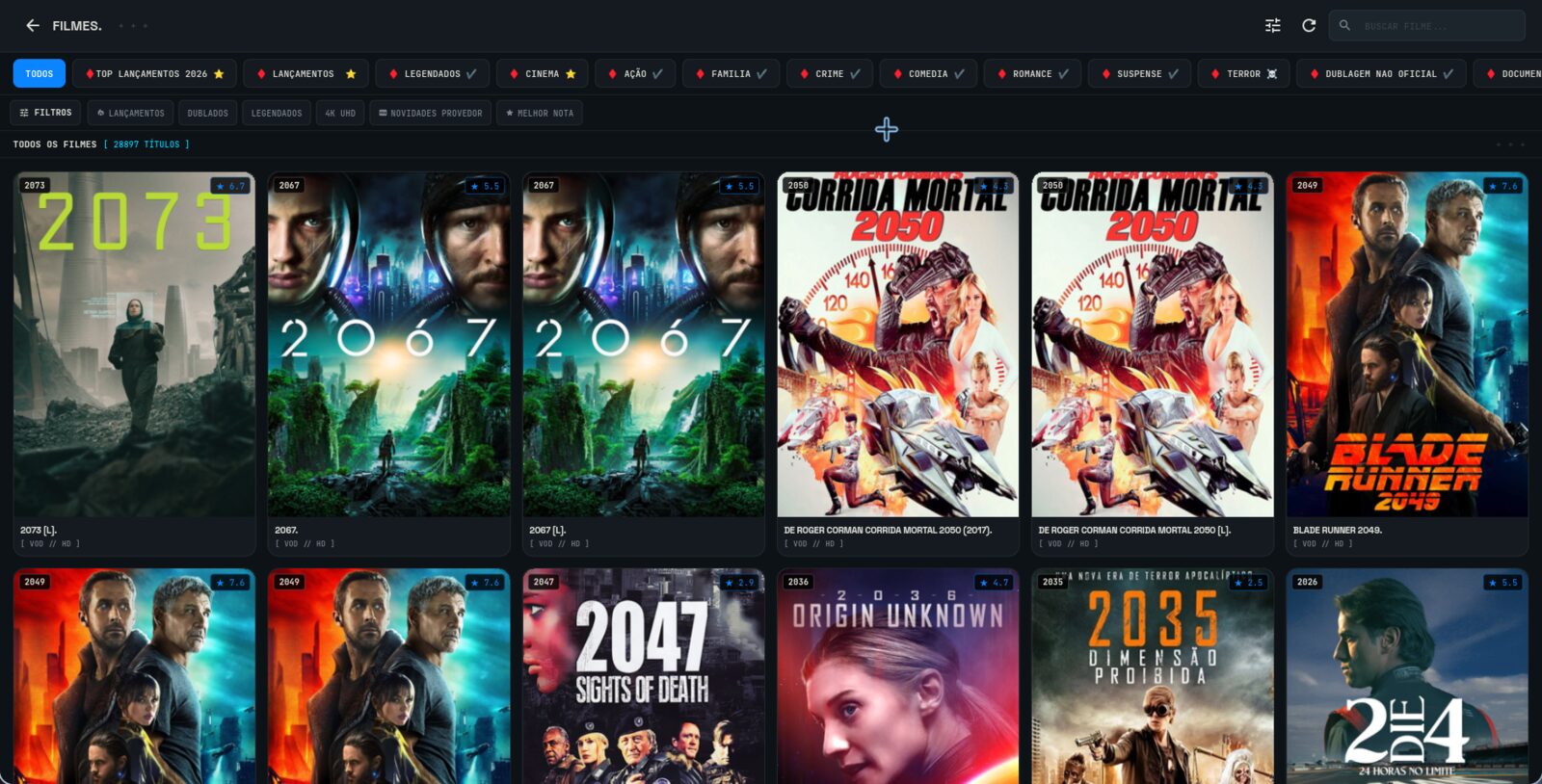
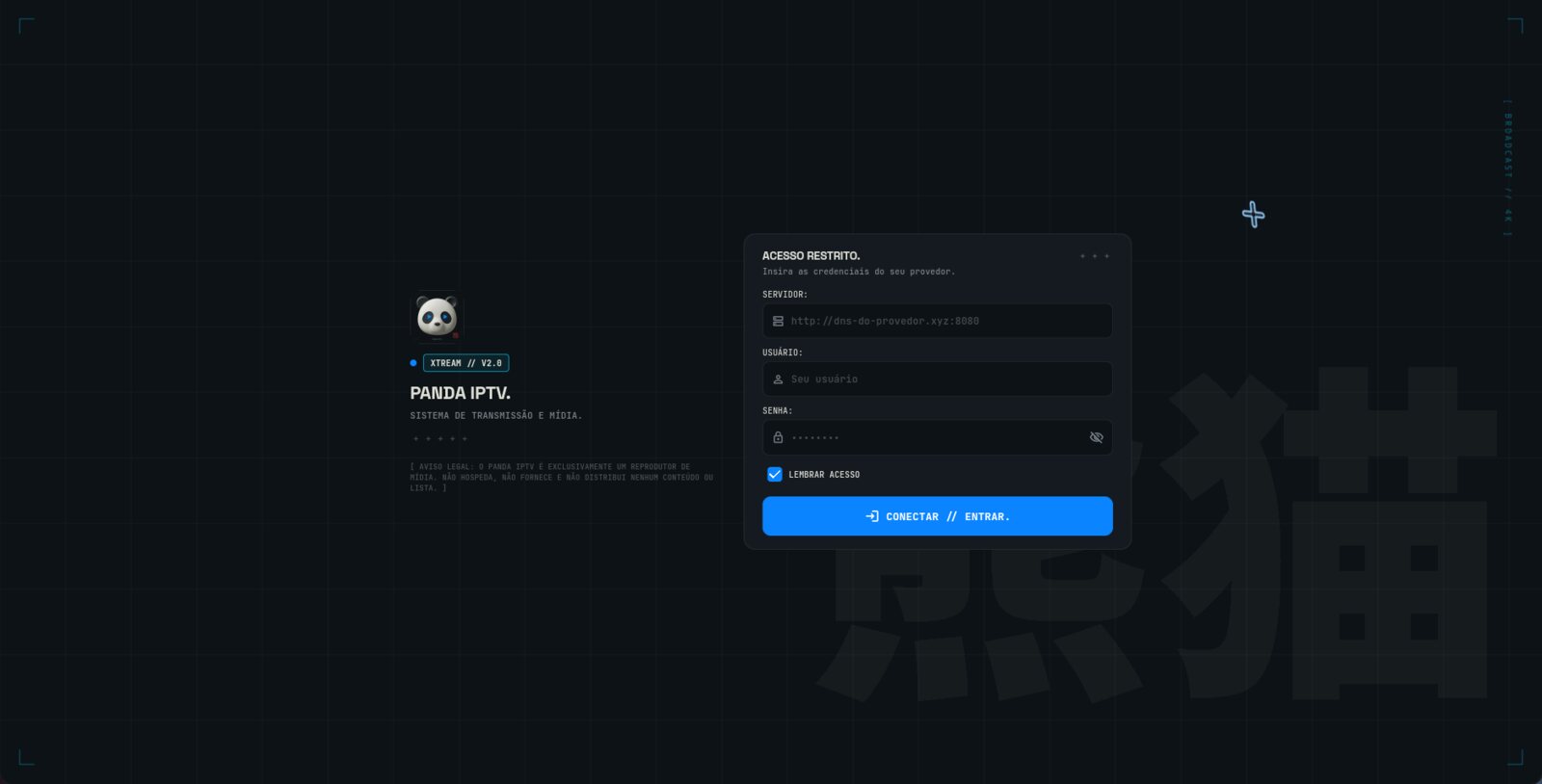
Oriental Brutalism on a TVOriental Brutalismo numa TV
The visual language is the same one behind this portfolio: bold uppercase type ended by an abrupt period, modular Bento tiles, and one surgical accent. For Panda IPTV that accent is Electric Blue, #0A84FF, over a near-black canvas.
Space is part of the design. The Japanese idea of Ma, the meaningful gap, keeps a wall of posters from turning into noise at three meters. Hanko-style status tags and kanji-inspired loaders carry the personality without covering the content.
A linguagem visual é a mesma por trás deste portfólio: tipografia maiúscula e pesada terminada por um ponto seco, tiles Bento modulares e um único acento cirúrgico. No Panda IPTV esse acento é o Azul Elétrico, #0A84FF, sobre um canvas quase preto.
O espaço faz parte do design. A ideia japonesa de Ma, o vazio com significado, impede que uma parede de pôsteres vire ruído a três metros. Selos de status estilo hanko e loaders inspirados em kanji carregam a personalidade sem cobrir o conteúdo.
Built for the remoteFeito para o controle remoto
Every screen, modal, drawer and player control works with a plain D-pad: up, down, left, right, OK, back. No touch fallback hiding in a corner.
That sounds simple until focus gets trapped in a top bar, or a dialog flickers when the Back key releases. The fix was a neon focus ring you can see from the sofa, traversal that never locks at the root, and PopScope on modals so a key-up does not close and reopen them.
On desktop the same screens answer to the keyboard: Space or K to pause, N and P for next and previous, D to cycle the decoder.
Toda tela, modal, gaveta e controle do player funciona com um D-pad comum: cima, baixo, esquerda, direita, OK, voltar. Sem fallback de toque escondido num canto.
Parece simples até o foco ficar preso na barra do topo, ou um diálogo piscar quando a tecla Voltar é solta. A solução foi um anel de foco neon visível do sofá, navegação que nunca trava na raiz e PopScope nos modais para que o key-up não feche e reabra.
No desktop as mesmas telas respondem ao teclado: Espaço ou K para pausar, N e P para próximo e anterior, D para alternar o decoder.
The playback engineO motor de reprodução
Playback runs on media_kit, which wraps libmpv. It gives hardware acceleration where it works and a safe path where it does not.
On Linux with Wayland and an Nvidia card, hardware decoding can paint blue frames or break the OpenGL context. So the default is software decoding (hwdec=no), and one key cycles SW Safe, Auto-Copy and HW Direct while the stream keeps playing.
Some providers throttle unknown clients, so requests identify as a standard IPTV player. Images get the same treatment through a global HttpOverrides.
A reprodução roda em media_kit, que encapsula o libmpv. Ele dá aceleração por hardware onde funciona e um caminho seguro onde não funciona.
No Linux com Wayland e placa Nvidia, o decode por hardware pode pintar quadros azuis ou quebrar o contexto OpenGL. Por isso o padrão é decode por software (hwdec=no), e uma tecla alterna SW Safe, Auto-Copy e HW Direct com o stream rodando.
Alguns provedores limitam clientes desconhecidos, então as requisições se identificam como um player IPTV padrão. As imagens recebem o mesmo tratamento por um HttpOverrides global.
ArchitectureArquitetura
Clean Architecture, feature first. Each feature owns its screens and state: auth, dashboard, vod, series, live, favorites, history, settings, player. Shared pieces live in core: storage services, localization and a small kit of brutalist widgets.
Everything personal stays on the device. Favorites, watch history, resume positions and recent channels are local services, so there is no account to create and nothing to sync.
Clean Architecture, feature first. Cada feature cuida das próprias telas e estado: auth, dashboard, vod, series, live, favorites, history, settings, player. O que é compartilhado vive em core: serviços de storage, localização e um pequeno kit de widgets brutalistas.
Tudo que é pessoal fica no dispositivo. Favoritos, histórico, posições de retomada e canais recentes são serviços locais, então não há conta para criar nem nada para sincronizar.
lib/
├─ core/
│  ├─ localization/   pt_BR · en_US · es_ES
│  ├─ storage/        history · favorites · recent · watched
│  ├─ theme/          Canvas #0D1216 · Bento #141A1F · Blue #0A84FF
│  └─ widgets/        bento_card · brutalist_button · hanko_badge
└─ features/
   ├─ auth/  dashboard/  vod/  series/
   ├─ live/  favorites/  history/  settings/
└─ player/ media_kit + D-pad traversalShipping to five targetsEntregando para cinco alvos
A tag push on GitHub triggers Actions, which builds the APK, the Windows portable zip, the Linux AppImage and the tarball, then publishes the release. On Arch it ships as panda-iptv-bin on the AUR.
For TVs there is no store friction: type a 7-digit code in the Downloader app, the APK downloads and the installer opens.
Um push de tag no GitHub dispara o Actions, que gera o APK, o zip portátil do Windows, o AppImage e o tarball do Linux, e publica a release. No Arch ele sai como panda-iptv-bin no AUR.
Para TVs não há fricção de loja: digite um código de 7 dígitos no app Downloader, o APK baixa e o instalador abre.
What it will not doO que ele não faz
Panda IPTV provides no channels, no movies, no playlists and no server endpoints. It ships empty. You bring credentials you are entitled to use.
It is MIT licensed with an explicit anti-piracy addendum, and it is not affiliated with any IPTV provider or reseller.
O Panda IPTV não fornece canais, filmes, playlists nem endereços de servidor. Ele vem vazio. Você traz credenciais que tem direito de usar.
A licença é MIT com um adendo explícito antipirataria, e não há afiliação com nenhum provedor ou revendedor de IPTV.